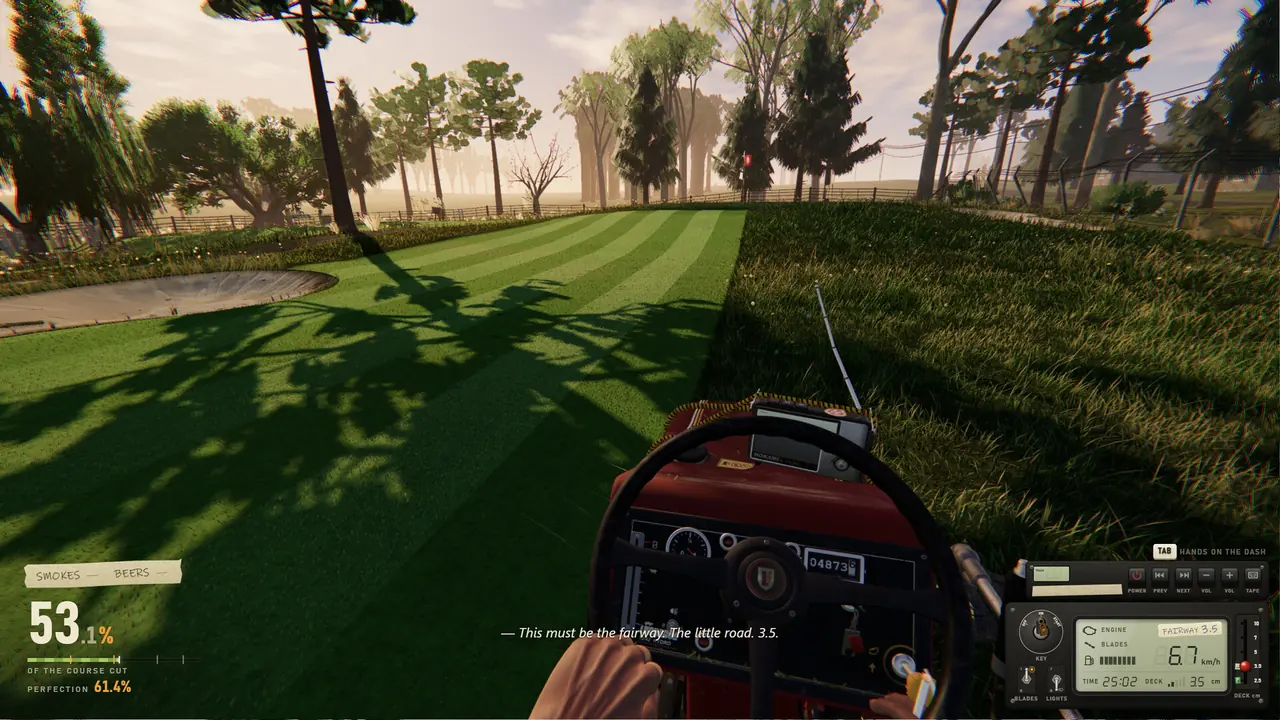
One More Lawn controls are less about memorizing keys and more about where you look. Most of the mower works like a real dashboard: you point the camera at a part and click it. The developer has not released a full key list, so the table below separates what the in-game tutorial shows, what several gameplay videos agree on, and what only one player has reported. Everything can be rebound, so treat these as defaults. New to the game? Our One More Lawn guide covers the jobs first.
What are the default One More Lawn controls on PC?
| Action | Default input | How sure we are |
|---|---|---|
| Start the engine | Look at the key, hold left mouse button | Tutorial prompt |
| Blades on | Look at the yellow knob, click | Tutorial prompt |
| Deck height | Look at the lever and drag, or scroll | Patch 1.0.2 (wheel) |
| Interact, pick up, attach the bag | E | Several gameplay videos |
| Drink a beer | Right mouse button | Several gameplay videos |
| Smoke | Left mouse button while seated | One player reported |
| Throw a bag, can or gas can | Hold to charge, release | On-screen prompt |
| Pause menu | Esc | Gameplay videos |
| Stop playing golf | G | Two gameplay videos |
| Fullscreen | F11 | Patch 1.0.2 |
The pause menu matters more than it looks. It shows your current cutting height and the height each area wants, which is the fastest way to check yourself on the golf course.
How do the dashboard controls work?
The heart of the One More Lawn controls is the dashboard. On it you'll find the key you hold to start, the blade switch, the height lever, the light switch, gauges for fuel and for the grass bag, and the radio. Each one works by looking at it and clicking. If you click the blade knob with the engine off, the game reminds you that the engine comes first. A crash also stalls the engine, so after a bump, look back at the key and hold the button again.
The lever sits low on the left, so you have to look down to grab it. Patch 1.0.2 lets the mouse wheel move it without aiming exactly, and fixed a bug where it shook or vanished at low frame rates. Gameplay videos also show a rear camera on the mower, handy when reversing out of tight corners.
How do you rebind keys in One More Lawn?
Rebinding has been in the game since demo update 0.9.18.
- Press Esc and open Options.
- Go to Controls, then Keys and Buttons.
- Pick the action and press the new key, mouse button or controller button.
- For a wheel, use the Wheel and Pedals section instead.
Controls and options travel with your Steam Cloud save since patch 1.0.2, so you only set them up once.
Do the One More Lawn controls work on a controller?
Yes. The Steam store lists full controller support, including DualShock and DualSense pads. The patches have fixed a few controller annoyances:
- Patch 1.0.1: Circle on a PlayStation pad no longer gets you off the mower, R2 no longer lights a cigarette, and DualShock 4 and DualSense work without Steam Input.
- Patch 1.0.2: separate horizontal and vertical sensitivity, a click on the left stick to jog (you can switch back to holding it), and native controller reading on Steam Deck and Linux.
If your PlayStation controller can only walk, Steam Input is turning it into a keyboard and mouse. Since 1.0.2 the game spots this, tells you once how to fix it, and the official Steam controller configuration was updated too.
Can you play One More Lawn with a steering wheel?
Yes. Force-feedback wheels and pedals are supported, and the recommended specs name the Logitech G29 and other DirectInput wheels. Map buttons in Wheel and Pedals. One wheel fix is worth knowing: when Steam maps a wheel to L1 and R1, the old man no longer lights a cigarette by accident (patch 1.0.2).
How do you use the trimmer and refuel?
Off the mower, the string trimmer hangs on the side. Hold the left button and pull back to rev it, then sweep the mouse left and right. If the swinging makes you queasy, turn on Trimmer: steady camera in Options > General (patch 1.0.2). The view stays still while you rev, the mouse moves only the trimmer, and the camera follows again when you let go.
Refueling is fiddly. In one launch-day stream the player held the right button with the gas can, then held the left button while aiming at the fuel cap. You can fill up from either side of the mower.
What if the One More Lawn controls stop responding?
A few fixes from patch 1.0.2 cover the usual complaints:
- After pausing with Esc, the game grabs the mouse again as soon as you resume.
- The old man no longer keeps walking by himself if a key seemed stuck.
- Pressing F11 twice no longer leaves black bars.
- If clicks fall through to the desktop, the game repairs the window itself. If it still happens, add
--oml-safeto the game's launch options in Steam.
Want to drive with friends next? See the One More Lawn co-op guide.
Sources: Steam store page, demo update 0.9.18, patch notes 1.0.1 and 1.0.2, and gameplay videos (player reports are labeled).